
Introduction
Palo’s portfolio system has four surfaces:
Palo 作品集系统包含四个入口:
| Surface | Route | Purpose |
|---|---|---|
| List page | /portfolio | All projects, paginated masonry grid |
| Tag filter | /portfolio/tag/{slug} | Projects matching a tag |
| Type filter | /portfolio/type/{id} | Projects by thumbnail aspect ratio |
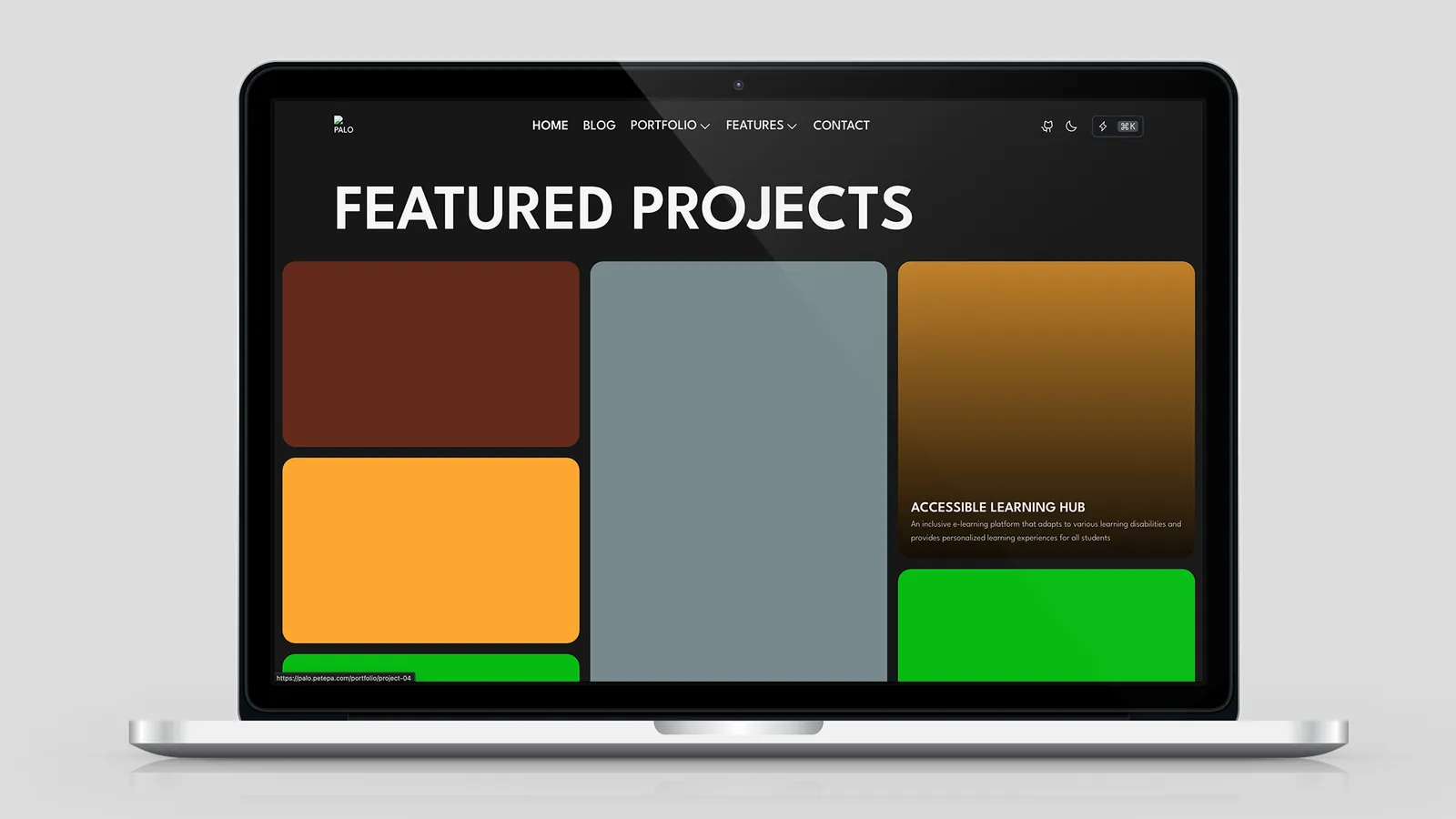
| FeaturedProjects | Homepage embed | Curated preview + “View all” link |
Almost all list styling is controlled from config.yaml → portfolio: — not hardcoded in page files.
列表样式几乎全部由 config.yaml → portfolio: 控制——不在页面文件中硬编码。
Configuration Overview (config.yaml)
All portfolio settings live under the portfolio: key in src/config.yaml. Pages read them via @config; pagination values flow through src/utils/listConfig.ts.
portfolio:
  pagination: { ... }      # Page size & sort order
  defaults: { ... }          # Visual "gene base" — inherited everywhere
  listPage: { ... }          # Overrides for /portfolio
  typePage: { ... }          # Overrides for /portfolio/type/*
  tagPage: { ... }           # Overrides for /portfolio/tag/*
  featuredComponent: { ... } # Defaults for <FeaturedProjects />
Inheritance chain
Each scene page merges settings in this order:
scene override (listPage | typePage | tagPage)
        ↓ falls back to
portfolio.defaults
        ↓ falls back to
hard-coded fallback in page .astro
columns: {} in a scene block means fully inherit defaults.columns.
场景块中 columns: {} 表示完全继承 defaults.columns。
See also Config: Everything You Like.
portfolio.pagination
Controls data fetching for list, tag, and type pages via listConfig.ts:
portfolio:
  pagination:
    pageSize: 10           # Projects per page
sortBy: "latest" # latest | oldest| Key | Values | Effect |
|---|---|---|
pageSize | integer ≥ 1 | Items per paginated page |
sortBy | latest | Regular projects: newest publishDate first (default) |
oldest | Regular projects: oldest publishDate first |
featuredOrder projects always pin to the top regardless of sortBy (see Sorting).
无论 sortBy 如何,设置了 featuredOrder 的项目始终置顶(见排序系统)。
# Example: 12 projects per page, oldest first
portfolio:
  pagination:
    pageSize: 12
    sortBy: oldest
No need to edit src/pages/portfolio/*.astro — restart dev after changing config.
无需编辑 src/pages/portfolio/*.astro——改 config 后重启 dev 即可。
portfolio.defaults — Visual Gene Base
Changing defaults updates every portfolio surface that doesn’t override the key — list page, tag page, type page, and FeaturedProjects (for shared layout props).
portfolio:
  defaults:
    showTags: true
    showStats: true
    layout: "overlay"          # overlay | standard
    width: "full"              # full | container
    gap: "gap-5"               # Tailwind gap class
    columns:
      initial: 1               # < 640px
      sm: 2                    # ≥ 640px
      lg: 3                    # ≥ 1024px
      xl: 3                    # ≥ 1280px
    tagsHeading: "h5"
    projectHeadingLevel: "h5"
projectDescClass: "text-base"| Key | Description |
|---|---|
showTags | Show tag filter nav on list/tag/type pages |
showStats | Show project stats on cards (when implemented) |
layout | ProjectCard layout — see Card layouts |
width | full = edge-to-edge masonry; container = max-width box |
gap | Masonry column gap (Tailwind gap-* class → CSS --project-list-gap) |
columns | Responsive masonry column counts (CSS variables, not dynamic Tailwind) |
tagsHeading | Heading level for the tag filter block |
projectHeadingLevel | HTML tag for each project title (h1–h6) |
projectDescClass | Tailwind class for card description text |
Why columns uses numbers, not cols-* classes: Palo injects column counts as CSS custom properties (--project-list-cols-sm, etc.) to avoid Tailwind purge issues with dynamically built class names.
为何 columns 用数字而非 cols-* 类名: Palo 将列数注入 CSS 变量(--project-list-cols-sm 等),避免动态拼接 Tailwind 类被 purge 掉。
Scene Overrides
portfolio.listPage → /portfolio
portfolio:
  listPage:
    title: "All Projects"
    subtitle: "A visual summary of every project, arranged as an overlay masonry gallery."
    allLabel: "All Projects"   # Tag filter "show all" button
    # Optional layout overrides (inherit defaults when omitted):
    # layout: overlay
    # width: full
    # gap: gap-5
    # columns: {}
Copy/SEO strings plus optional layout overrides. Current Palo inherits layout from defaults for most keys.
portfolio.typePage → /portfolio/type/{id}
portfolio:
  typePage:
    layout: "standard"     # Clear text-below-image layout for type grids
    width: "container"
    gap: "gap-6"
    columns: {}            # Inherit defaults.columns
Type pages filter by project type frontmatter (default, video, shot, album, poster).
portfolio.tagPage → /portfolio/tag/{slug}
portfolio:
  tagPage:
    layout: "overlay"
    width: "container"
    gap: "gap-5"
    columns: {}
Tag pages filter by project tags frontmatter array.
Partial override example
Override only desktop columns on the main list:
portfolio:
  defaults:
    columns: { initial: 1, sm: 2, lg: 3, xl: 3 }
  listPage:
    columns: { lg: 4, xl: 5 }   # merges — sm/initial stay from defaults
portfolio.featuredComponent → <FeaturedProjects />
Homepage featured block defaults:
portfolio:
  featuredComponent:
    limit: 10
    title: "Featured Projects"
    buttonText: "View All Projects"
    buttonAlign: right          # left | center | right
Used on src/pages/index.astro:
<FeaturedProjects />With no props, the component reads featuredComponent + defaults from config.
不传 prop 时,组件从 config 读取 featuredComponent + defaults。
FeaturedProjects Component
Path: src/components/FeaturedProjects.astro
Props
| Prop | Default source | Description |
|---|---|---|
limit | featuredComponent.limit | Max projects shown |
title | featuredComponent.title | Section <h2> text |
buttonText | featuredComponent.buttonText | Link to /portfolio |
buttonAlign | featuredComponent.buttonAlign | left | center | right |
layout | defaults.layout | overlay | standard |
width | defaults.width | full | container |
gap | defaults.gap | Tailwind gap class |
sortBy | 'latest' (prop only) | latest | earliest |
projectHeadingLevel | defaults.projectHeadingLevel | Card title tag |
projectDescClass | defaults.projectDescClass | Card description class |
class | — | Extra section classes |
colsClass | — | Deprecated, no effect — use defaults.columns |
<!-- Override config for a one-off homepage block -->
<FeaturedProjects
  limit={6}
  title="Recent Work"
  sortBy="earliest"
  layout="standard"
/>
Includes a “View all projects” button linking to /portfolio.
包含指向 /portfolio 的「查看更多」按钮。
ProjectCard Layouts
layout | Appearance |
|---|---|
overlay | Text over image bottom; no tag pills |
standard | Image on top, title + description + tag pills below |
Thumbnail aspect ratio comes from project type (see below), not from layout.
缩略图宽高比由 project type 决定,与 layout 无关。
Portfolio List Pages
Main list — /portfolio
- Masonry grid (
.project-masonry) with responsive columns from config - Tag filter nav when
showTags: true PaloPageHeadertitle/subtitle fromlistPage- Pagination at bottom
Tag pages — /portfolio/tag/{slug}
- Filters projects containing the tag
- Tag slug via
slugify()— e.g.Web Design→web-design - Inherits
tagPage→defaultslayout config - Dual-axis sort (
featuredOrder+pagination.sortBy)
Type pages — /portfolio/type/{id}
Types are defined in src/projectTypes.ts:
type id | Label | Ratio | Use case |
|---|---|---|---|
default | Default | 8:5 | General landscape work |
video | Video | 16:9 | Video / motion |
shot | Shot | 9:16 | Vertical mobile shots |
album | Album | 1:1 | Square compositions |
poster | Poster | 5:7 | Portrait posters |
# Project frontmatter
type: video
Type pages also appear in the nav Portfolio dropdown (/portfolio/type/{id}).
类型页也出现在导航 Portfolio 下拉菜单中。
Project Frontmatter
---
title: My Project
description: Short card summary
publishDate: 2026-06-07
type: default              # default | video | shot | album | poster
tags: ['Web Design', 'A11y']
coverImage: ./cover.jpg
featuredOrder: 1           # Optional — pin to top (lower = higher)
draft: false
---| Field | Purpose |
|---|---|
featuredOrder | Pin project to top of lists; ascending order (1 before 2) |
type | Thumbnail aspect ratio + type filter routing |
tags | Tag filter pages; shown on standard cards (max 3 + overflow) |
coverImage | Card/list thumbnail — supports ./ co-location |
Sorting System
Dual-axis engine (list + tag + FeaturedProjects)
1. Projects WITH featuredOrder  →  sort ascending (1, 2, 3…)
2. Projects WITHOUT featuredOrder  →  sort by sortBy (latest / oldest)
3. Concatenate: [featured..., regular...]
Where sort applies
| Page / component | Uses pagination.sortBy | Uses featuredOrder |
|---|---|---|
/portfolio | ✅ | ✅ |
/portfolio/tag/* | ✅ | ✅ |
/portfolio/type/* | ❌ (publishDate desc only) | ❌ |
<FeaturedProjects sortBy> | prop (latest / earliest) | ✅ |
Customization Recipes
Wider masonry on desktop only
portfolio:
  defaults:
    columns: { initial: 1, sm: 2, lg: 3, xl: 3 }
  listPage:
    columns: { xl: 4 }
Standard layout + container on type pages, overlay everywhere else
portfolio:
  defaults:
    layout: overlay
    width: full
  typePage:
    layout: standard
    width: container
Smaller homepage featured strip
portfolio:
  featuredComponent:
    limit: 3
    title: "Selected Work"
    buttonText: "See portfolio"
    buttonAlign: center
Pin launch projects
# project-a/index.mdx
featuredOrder: 1

# project-b/index.mdx
featuredOrder: 2
Tips
Edit
config.yaml, not page files — layout changes should go throughportfolio.defaultsor scene overridesUse
typefor aspect ratio — one type per project; drives card proportionsUse
tagsfor cross-cutting filters — a project can have many tagsUse
featuredOrdersparingly — 2–5 pinned items keeps the list readablecolsClassis deprecated — configuredefaults.columnsinsteadRestart dev after config changes — config is read at build/dev startup
改
config.yaml,不改页面文件 — 布局变更走portfolio.defaults或场景 overridetype控制宽高比 — 每个项目一个 typetags做交叉筛选 — 一个项目可有多个 tagfeaturedOrder少量使用 — 置顶 2–5 个为宜colsClass已废弃 — 用defaults.columns改 config 后重启 dev — config 在启动时读取
Conclusion
Palo’s portfolio is config-driven: portfolio.defaults sets the visual DNA, scene blocks fine-tune each route, featuredComponent controls the homepage strip, and pagination handles page size and sort order. Combine with project frontmatter (type, tags, featuredOrder, coverImage) for a filterable, pin-aware masonry gallery.
Palo 作品集由 config 驱动:portfolio.defaults 设定视觉基因,场景块微调各路由,featuredComponent 控制首页推荐区,pagination 管理分页与排序。配合 project frontmatter(type、tags、featuredOrder、coverImage)即可构建可筛选、可置顶的 masonry 画廊。
Share this post
Like this post? Share it with your network!